Using the Dashboard
In Deep Planner, the dashboard provides information about the current development schedule and team priorities. It is designed to be a single source of truth concerning the current development agenda for managers, stakeholders, and teams working on their tasks.
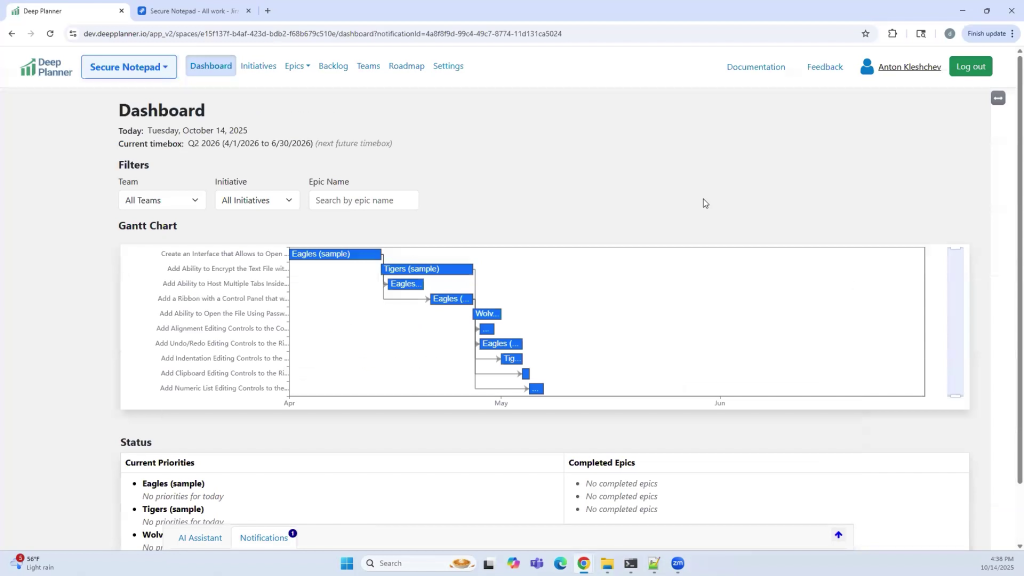
Gantt Chart
The Gantt chart shows the current development schedule. Rows represent epics and their planned position in the timebox calendar. Titles inside the task bars represent the team names assigned to a particular epic. The icon next to the task bars represents the epic delivery status. The green line indicates the current calendar day.
Delivery Statuses
Delivery status is an indication of epic progress. It is estimated based on the following:
- On Time: The epic is in the status In Progress. The delivery date has not been reached.
- At Risk: The epic is not in the status In Progress. The delivery date has not been reached.
- Delayed: The epic’s delivery date has passed.
- Done: The epic is in the status Done.
Delivery status changes automatically upon alterations in the underlying delivery date or epic status.
Status Table
The status table shows priorities and completed epics grouped by teams, their expected due dates, and delivery status. Only epics that have a start date earlier or later than today are shown.
Filtering
It is possible to filter by team, initiative, or epic name. Use the Filters section to select and apply the filters.
0 Comments